

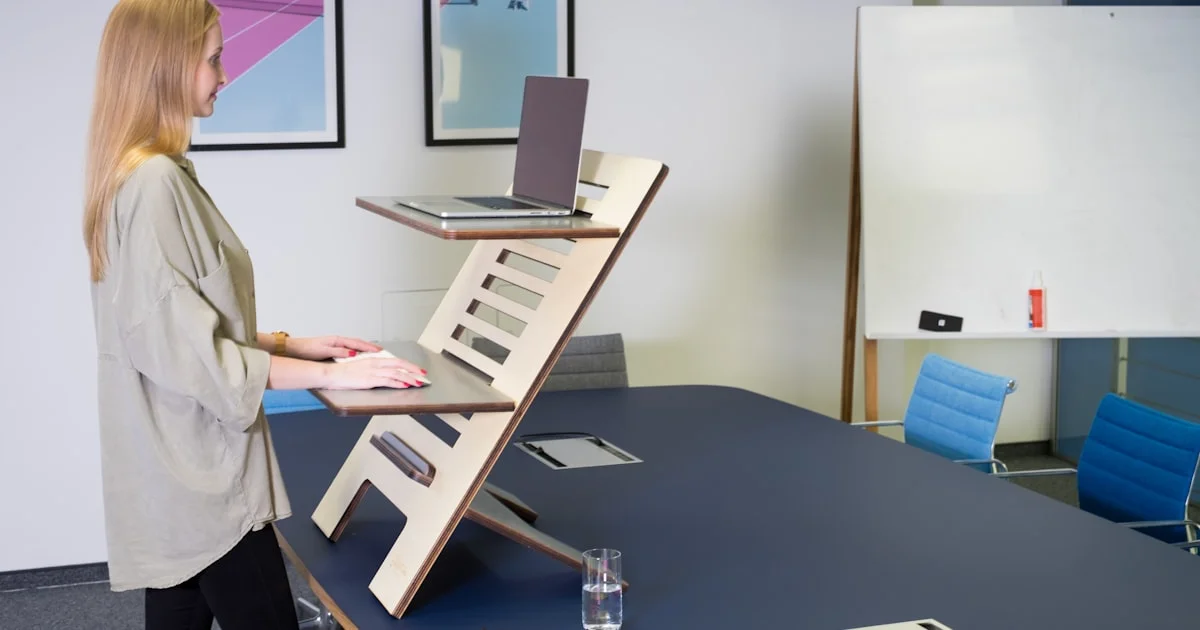
Working from a kitchen table all day takes a toll on your back and neck. A standing desk converter for home office use lets you switch between sitting and standing without buying a whole new desk. It sits right on top of the desk you already own, so you get the health benefits of a sit-stand setup without the cost or the hassle of a full desk replacement.
Key Takeaways
- A standing desk converter sits on your existing desk and raises your monitor and keyboard to standing height, so you don’t need to buy a new desk.
- Weight capacity and desktop footprint matter more than brand name — measure your monitors and desk space before you buy.
- Gas-spring and crank models adjust height smoothly, while pneumatic and electric models cost more but move faster.
- A separate keyboard tray keeps your wrists at a healthier angle than a single flat platform.
- Budget converters in the $80–$180 range handle most single-monitor home office setups just fine.
Best Standing Desk Converter for Home Office Use: The Short Answer
The short answer: the best standing desk converter for home office setups is a two-tier model with a separate keyboard shelf, a weight rating above 25 pounds, and a smooth height-adjustment mechanism you can operate with one hand. Look for a footprint that matches your desk depth and a spring or crank system rated for daily use, not occasional use. That combination covers dual monitors, a keyboard and mouse, and enough clearance to switch positions several times a day without straining your shoulders.
What a Desk Converter Actually Does
A desk converter is a platform that rests on top of your current desk. You lower it to sit and raise it to stand, usually with a spring-assisted lift, a hand crank, or an electric motor. Most models have two tiers: a top surface for your monitor or laptop, and a lower shelf for your keyboard and mouse. That second tier matters because it keeps your wrists closer to a neutral, straight position instead of angling up toward a single raised platform.
Height range is the first thing to check. A good converter should let you sit comfortably at your normal desk height and stand tall enough that your elbows sit at roughly a 90-degree angle when typing. If you’re tall or short outside the average range, check the exact height specs before buying rather than assuming “adjustable” covers your height.

Types of Adjustable Desk Riser Mechanisms
An adjustable desk riser comes in a few different lift styles, and the mechanism changes how it feels day to day. Gas-spring risers use a counterbalance spring, so you lift a lever and the platform glides up or down with light effort. Crank-based risers use a hand crank on the side, which takes longer to adjust but tends to be sturdier under heavy monitor setups. Electric risers use a motor and a button, which is the fastest and smoothest option but adds real cost.
- Gas-spring risers: fast, low effort, good for people who switch positions often during the day.
- Crank risers: slower but very stable, a solid pick for dual-monitor arms or heavier equipment.
- Electric risers: push-button convenience, best for shared desks or anyone with limited hand strength.
Whichever mechanism you pick, test the adjustment range with your actual monitor setup in mind. A riser that only goes up 15 inches might not clear a tall monitor arm, and one that goes too high can push your screen above comfortable eye level.
Finding a Budget Standing Desk That Still Holds Up
A budget standing desk converter doesn’t have to feel flimsy. The difference between a $60 model and a $150 model usually comes down to weight capacity, desktop material, and how smoothly the lift mechanism operates over months of daily use. Cheaper models often use thinner steel frames and lighter-duty springs that can start to sag or squeak within a year of regular use.
If you’re working with a tight budget, prioritize weight capacity over extra features like USB ports or phone stands. A sturdy 25-pound-rated frame that lasts three years beats a feature-packed model that wobbles under a 27-inch monitor. Check return policies too — a converter that feels great in photos can still feel unstable once your actual monitor and keyboard are loaded onto it.
How to Choose the Right Sit Stand Desk Setup
A sit stand desk converter should match three things: your desk’s depth, your monitor count, and how often you actually plan to stand. If your existing desk is shallow, a deep converter will hang off the edge and feel unstable. If you run two monitors, look for a wider top tier or a model built specifically for dual-screen use.
Measuring Your Desk First
Measure your desk’s depth and width before ordering. Most converters list their footprint in the product specs, and a mismatch is one of the most common return reasons. Leave a few inches of clearance on each side so the unit doesn’t feel cramped.
Thinking About How Often You’ll Stand
If you plan to alternate every 30 to 60 minutes, a fast gas-spring model saves time over a whole workday. If you mostly stay standing for long stretches, a sturdier crank model with a wider platform will feel more stable over hours of use.
Setting Up Your Converter for Better Posture
Getting the height right matters more than the price tag. Here’s a simple way to dial it in:
- Stand naturally and let your arms hang relaxed at your sides.
- Bend your elbows to 90 degrees — that’s roughly where your keyboard tray should sit.
- Raise the monitor tier so the top of the screen sits at or just below eye level.
- Check that your wrists stay flat and straight, not bent up or down, while typing.
- Adjust again after a few days once your body settles into the new setup.
Small adjustments over the first week make a bigger difference than getting it perfect on day one. Your body needs time to adapt to standing more during the day, so don’t force long standing sessions right away.
Common Mistakes People Make
The most common mistake is standing too long, too soon. Jumping from an all-day-sitting habit to hours of standing can leave your feet and lower back sore. Start with 20 to 30 minutes at a time and build up gradually. Another frequent issue is skipping an anti-fatigue mat — standing on a hard floor for long stretches is harder on your joints than most people expect.
People also tend to overload the top tier with more than the converter is rated for, which can cause the lift mechanism to wear out early or the platform to tilt under weight. Stick to the manufacturer’s weight limit, and if you’re close to it, choose the next size up rather than pushing the limit.
Comparing Standing Desk Converter Styles
| Style | Best For | Trade-offs |
|---|---|---|
| Gas-spring, single tier | Laptop-only setups, small desks | No separate keyboard tray, less ideal for typing posture |
| Two-tier gas-spring | Single monitor plus keyboard/mouse | Great balance of speed and posture support, mid-range price |
| Crank, dual-tier | Heavier dual-monitor setups | Slower to adjust, but very stable under weight |
| Electric | Shared desks, frequent height changes | Fastest and smoothest, but the highest price point |
Frequently Asked Questions
Here are a few common questions people ask before buying a standing desk converter.
Do standing desk converters work on any desk?
Most work on any flat, sturdy desk surface, but check the converter’s footprint against your desk’s dimensions first. Very narrow or curved desks may not give the base enough stable contact area.
How much weight can a typical converter hold?
Budget models usually handle 20 to 25 pounds, which covers one monitor plus a keyboard and mouse. Dual-monitor setups should look for a rating closer to 30 to 35 pounds.
Is a standing desk converter worth it if I only stand occasionally?
Yes — even standing for short stretches throughout the day helps break up long sitting periods, which is the main health benefit people are after. You don’t need to stand all day to get value from one.
Do I still need an anti-fatigue mat?
It’s not required, but most people find standing for more than 20 to 30 minutes at a time is noticeably more comfortable with one. It’s a small add-on cost that makes a real difference.
Conclusion
A good standing desk converter is one of the simplest upgrades you can make to a home office without buying new furniture. Focus on weight capacity, a separate keyboard tier, and a lift mechanism that matches how often you’ll actually switch positions. Get the height dialed in over your first week, and it becomes an easy habit rather than a chore.


